Introduction
Cloud computing has transformed the way businesses manage applications, data, and IT infrastructure. Instead of relying on expensive on-premises servers, organizations now use cloud platforms to access computing resources over the internet. This shift improves flexibility, reduces costs, and supports faster innovation.
The Droven.io cloud computing guide is designed to simplify cloud technology for beginners, IT professionals, students, and business owners. It explains how cloud computing works, why it has become essential for modern organizations, and how companies can successfully adopt cloud-based solutions. Whether you are learning the basics or exploring advanced cloud concepts, this guide provides a practical overview of today’s cloud ecosystem.
What Is the Droven.io Cloud Computing Guide?
The Droven.io cloud computing guide is an educational resource that introduces readers to cloud computing concepts in a simple and structured way. Rather than focusing on complex technical jargon, it explains the fundamentals using real-world examples.
The guide typically covers:
- Cloud computing basics
- Cloud service models
- Cloud deployment options
- Business benefits
- Security practices
- Migration strategies
- Future cloud trends
Its purpose is to help readers understand how cloud technologies improve business operations while making informed decisions about adopting cloud solutions.
Understanding Cloud Computing
Cloud computing is the delivery of computing services through the internet instead of using physical hardware installed within an organization.
These services include:
- Virtual servers
- Data storage
- Databases
- Networking
- Artificial intelligence tools
- Software applications
- Analytics platforms
Businesses only pay for the resources they use, making cloud computing both scalable and cost-effective.
How Cloud Computing Works
Cloud providers maintain massive data centers that host servers, storage devices, and networking infrastructure. Users connect to these resources through secure internet connections without managing the physical hardware themselves.
This allows businesses to:
- Launch applications quickly
- Scale resources when demand increases
- Reduce hardware investments
- Improve disaster recovery
- Enable remote work
Main Types of Cloud Deployment
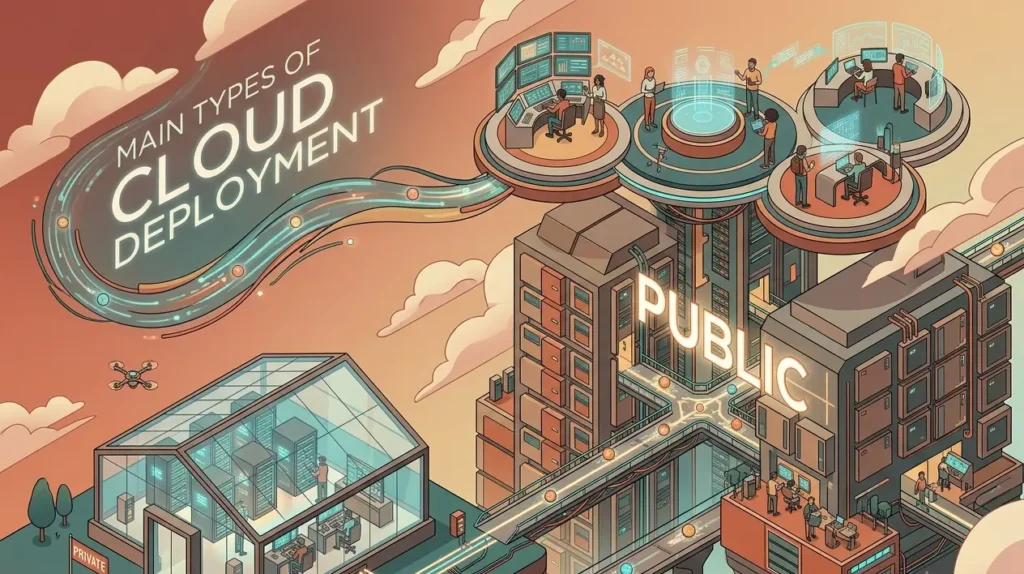
Choosing the right deployment model depends on business requirements, security needs, and budget.
Public Cloud
A public cloud is operated by third-party providers that deliver computing resources over the internet.
Benefits include:
- Lower infrastructure costs
- Fast deployment
- High scalability
- Minimal maintenance
Public cloud services are suitable for startups, small businesses, and growing organizations.
Private Cloud
A private cloud is dedicated to one organization and offers greater control over infrastructure and security.
It is commonly used by:
- Government organizations
- Healthcare providers
- Financial institutions
- Large enterprises
Hybrid Cloud
Hybrid cloud combines public and private cloud environments.
Organizations can:
- Keep sensitive workloads in private infrastructure
- Run less critical applications in the public cloud
- Improve flexibility while maintaining compliance
Multi-Cloud
A multi-cloud strategy uses services from multiple cloud providers.
Advantages include:
- Reduced vendor dependency
- Better workload optimization
- Improved reliability
- Greater business continuity
Cloud Service Models Explained
Understanding cloud service models helps businesses choose the right level of control and management.
Infrastructure as a Service (IaaS)
IaaS provides virtualized computing resources over the internet.
Businesses receive:
- Virtual machines
- Networking
- Storage
- Operating systems
This option offers maximum flexibility for developers and IT teams.
Platform as a Service (PaaS)
PaaS supplies a complete development environment where developers can build, test, and deploy applications without managing servers.
Benefits include:
- Faster application development
- Simplified deployment
- Built-in development tools
- Reduced infrastructure management
Software as a Service (SaaS)
SaaS delivers software applications directly through web browsers.
Examples include:
- Email platforms
- Customer relationship management software
- Video conferencing tools
- Project management applications
Users simply log in without installing or maintaining software locally.
Benefits of Cloud Computing
Cloud technology delivers advantages for businesses of every size.
Lower Operational Costs
Organizations avoid purchasing expensive servers and hardware. They pay only for the computing resources they consume.
Better Scalability
Cloud infrastructure grows with business demand. Companies can increase or decrease resources within minutes.
Improved Collaboration
Employees can securely access files and applications from different locations, making remote work more efficient.
Enhanced Security
Leading cloud platforms invest heavily in security technologies including:
- Encryption
- Identity management
- Threat monitoring
- Multi-factor authentication
- Automatic updates
Reliable Backup and Recovery
Cloud platforms continuously back up data and simplify disaster recovery after hardware failures or cyber incidents.
Common Business Applications
Cloud computing supports nearly every industry.
Popular use cases include:
- Website hosting
- Mobile application development
- Business analytics
- Artificial intelligence
- Machine learning
- Video streaming
- E-commerce platforms
- Data backup
- Enterprise software
- Remote collaboration
Organizations benefit from faster deployment while maintaining high availability.
Cloud Migration Process
Migrating to the cloud requires careful planning.
Typical migration steps include:
Evaluate Existing Infrastructure
Organizations identify applications, databases, and workloads suitable for cloud deployment.
Define Business Goals
Businesses establish objectives such as reducing costs, improving performance, or enhancing scalability.
Select the Appropriate Cloud Model
Choosing between public, private, hybrid, or multi-cloud depends on security requirements and workload characteristics.
Transfer Applications
Applications and data are migrated using carefully planned deployment strategies to minimize downtime.
Monitor Performance
After migration, organizations monitor performance, optimize workloads, and improve resource utilization.
Security Best Practices
Security remains one of the most important aspects of cloud computing.
Businesses should implement:
- Strong password policies
- Multi-factor authentication
- Data encryption
- Regular software updates
- Access control management
- Continuous monitoring
- Employee cybersecurity training
- Frequent security audits
Combining these practices helps reduce security risks while protecting sensitive information.
Challenges of Cloud Computing
Although cloud technology offers significant advantages, businesses should understand potential challenges.
Common challenges include:
- Internet dependency
- Vendor lock-in
- Data privacy concerns
- Compliance requirements
- Migration complexity
- Cost management
- Skills shortages
Planning and proper governance help organizations overcome these obstacles.
Future Trends in Cloud Computing

Cloud computing continues to evolve rapidly.
Some important trends include:
Artificial Intelligence Integration
AI-powered cloud services automate operations, improve analytics, and enhance customer experiences.
Edge Computing
Processing data closer to users reduces latency and improves application performance.
Serverless Computing
Developers focus entirely on writing code while cloud providers automatically manage infrastructure.
Green Cloud Computing
Cloud providers increasingly invest in renewable energy and energy-efficient data centers to reduce environmental impact.
Automation
Businesses use automation tools to simplify deployments, infrastructure management, and routine maintenance.
Droven.io IT Services in USA
Along with educational cloud resources, searches for Droven.io IT services in USA often relate to organizations looking for guidance on digital transformation and modern IT practices.
Businesses evaluating cloud adoption typically seek support in areas such as:
- Cloud strategy planning
- Infrastructure modernization
- Digital transformation consulting
- Security assessments
- Data management
- Cloud migration planning
- IT optimization
- Automation recommendations
These services help organizations align technology investments with long-term business objectives while improving operational efficiency.
Cloud Computing vs Traditional IT Infrastructure
| Feature | Cloud Computing | Traditional Infrastructure |
|---|---|---|
| Initial Cost | Lower | Higher |
| Scalability | High | Limited |
| Maintenance | Provider-managed | Organization-managed |
| Deployment Speed | Fast | Slow |
| Accessibility | Anywhere with internet | Mostly on-site |
| Hardware Investment | Minimal | Significant |
| Automatic Updates | Yes | Manual |
| Disaster Recovery | Easier | More complex |
Who Should Read This Guide?
The Droven.io cloud computing guide is valuable for:
- Business owners
- Startup founders
- Students
- IT professionals
- Developers
- System administrators
- Technology enthusiasts
- Digital transformation teams
It provides practical knowledge regardless of technical experience.
Frequently Asked Questions
What is the Droven.io cloud computing guide?
It is an educational resource that explains cloud computing concepts, deployment models, service types, security practices, migration strategies, and business applications in an easy-to-understand format.
Why is cloud computing important?
Cloud computing helps businesses reduce infrastructure costs, improve flexibility, scale resources efficiently, and support remote collaboration.
What are the three main cloud service models?
The primary service models are Infrastructure as a Service (IaaS), Platform as a Service (PaaS), and Software as a Service (SaaS).
Is cloud computing secure?
Yes. Modern cloud platforms implement advanced security measures such as encryption, identity management, continuous monitoring, and compliance controls. Organizations should also follow security best practices to protect their data.
Which businesses benefit most from cloud computing?
Businesses of all sizes benefit from cloud computing, including startups, small businesses, enterprises, educational institutions, healthcare organizations, and financial companies.
What is hybrid cloud?
Hybrid cloud combines private and public cloud environments, allowing organizations to balance flexibility, security, and cost efficiency.
How does cloud computing reduce costs?
Organizations avoid purchasing expensive hardware, reduce maintenance expenses, and pay only for the computing resources they actually use.
Conclusion
Cloud computing has become an essential part of modern business technology, enabling organizations to innovate faster, improve operational efficiency, and adapt to changing market demands. The Droven.io cloud computing guide offers a practical introduction to cloud concepts, helping readers understand deployment models, service options, security practices, migration strategies, and future trends. Whether you are a beginner exploring cloud technology or a business planning digital transformation, learning these fundamentals provides a strong foundation for making informed technology decisions. As cloud adoption continues to grow across industries, understanding these concepts will remain valuable for businesses seeking greater scalability, resilience, and long-term success.